Firewall
Occasionally, school network security systems may interfere with online software, leading to problems accessing services and/or library content. Local network firewalls may cause errors during use, loading, and saving.
If you encounter loading/saving issues with Memento Yearbook, contact your local IT specialist to request that they whitelist *.yearbooks.me
Some network filters don't support wildcards, in which case whitelist the following domains:
- https://editor.yearbooks.me
- https://books.yearbooks.me
- https://messages.yearbooks.me
- https://publishers.yearbooks.me
- https://images.yearbooks.me
- https://status.yearbooks.me
- https://shops.yearbooks.me
Storage and font access require the following to be whitelisted as well:
- https://s3.amazonaws.com
- https://fonts.googleapis.com
- https://fonts.gstatic.com
- https://di1yjc7ko0ctw.cloudfront.net
Browser Extensions
A browser extension is a small program installed on your web browser (eg. Chrome, Firefox, Safari, etc.) that adds features. Common examples include ad blockers, password managers and grammar/spelling checkers. Unfortunately, browser extensions may interfere with online software such as Memento Yearbook.
If you're experiencing issues while using Memento Yearbook, try the following:
- Disable any browser extensions to verify if Memento begins to work normally.
- If disabling extensions solves the issue, re-enable them one by one to identify the specific extension causing the problem.
- Adjust the settings of the problematic extension or keep it disabled while using Memento Yearbook.
| Browser extensions are indicated with a puzzle piece icon. Chrome, Edge and Firefox display these in the top right corner of the browser. | 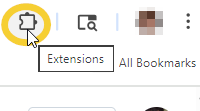 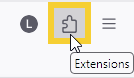  | Safari browser extensions are available under the Safari menu item.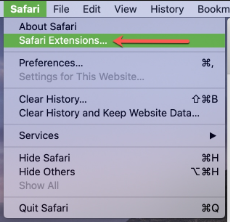 |
Antivirus Software
Antivirus programs may restrict access to online platforms. To ensure uninterrupted access to Memento Yearbook, try the following:
- Check your antivirus settings and look for any features that might block or restrict access to certain websites.
- Add Memento Yearbook to the list of allowed or trusted sites within your antivirus program.
- If you're unsure how to make these changes, consult with your IT specialist for guidance.
"Failed to Load Book" error
If you receive the message Failed to load book – Please log in and try again, the issue may be caused by an antivirus program blocking access, a browser extension causing incompatibility or cookie caching issues in your browser.
Try the following steps to resolve this error:
- Whitelist editor.yearbooks.me in your antivirus software.
- Disable browser plugins and check if the issue persists.
- Clear cached cookies for editor.yearbooks.me in your browser.
If the problem continues, try using a different browser or contact support for further assistance.
Was this article helpful?
That’s Great!
Thank you for your feedback
Sorry! We couldn't be helpful
Thank you for your feedback
Feedback sent
We appreciate your effort and will try to fix the article